17 January, 2014

the Music Maker Jam loops and jams creator

Music Maker Jam is your way to create your own music on a tablet or a smartphone wherever you want - whenever you want. This free and straight-forward music maker app from MAGIX, makes it easy to start playing with music and mixing your own songs in no time. The loops from various musical genres allow you to create your own song in an instant. The professionally produced loops can be combined with each other to make your own new favorite song. Give your song some structure by combining the various song parts. Adjust the tempo and change the melody with your fingertips. Add amazing effects to songs in realtime. Mix songs using the 8-track mixer for a perfect sound. The sounds are professional and sound great individually or when combined. Jam Sessions can also be saved directly as an audio file. It features : various music styles with professionally produced loops, ability to adjust the tempo (BPM) and melody using the step sequencer, amazing effects can be added to songs in realtime, the songs are created (mixed) via the 8-track mixer, clear song structure thanks to the individual song parts, different music styles combination via the loop selector. The Music Maker Jam is available in the Windows 8 store as well as on the Android store for mobile smartphone users.

This is a very lite version of Magix Music Maker utilising the same concept of Soundpools, like the Full Windows Music Maker versions, alas in a more stylized, visual and simpler way to use. The supplied loops seem at first to be not compatible with other Magix Music Maker programs, however there is a tutorial here of how to import soundpools from the Jam version to the Full Windows Music Maker (ver 2013,14). The other way round though, is not that simple since it involves a lot of xml writing and editing of files (as well as extensive cross referencing of loops, etc. – a pain).  Music Maker Jam is a great beginners program, simple and easy to understand. Loops can be perfect for kids playing also. But giving it a twist, and since the intuitive touchscreen control incorporated is intended to put the full studio experience in the palm of your hand, with sounds perfectly synchronized to keep you on the beat, how about you start jamming live in front of your friends and fans ?

05 January, 2014

the most innovative Multitouch DJ Set ever (so far)

Gregory Kaufman, is a Texas born designer, working as a full time designer for Stimulant. He creates visual design, interaction design, motion design, video post production, illustrates, photographs, and edits music. Multi-faceted and multi-talented individual as he is, has displayed what for me has been the most innovative interface design I have ever come across, with regards to Djing (mixing consoles etc.). While a student at Kansas City Art Institute his Senior Degree Project has been a DJ touch screen interface and realized gesture interaction concept, the likes of which the “world has never seen before”. Described also as a Multi Touch Light Table, the application lets DJs consolidate all their gear into a single flash-drive. Pop it into a laptop, and a slick touchscreen interface appears that functions like both a pair of turntables and digital mixers. In his own words : “Frustrated with the digital djing software available, I designed this multitouch turntable interface application. This interface allows Djs to have full control of what they are doing without the need to constantly look down. By using large touch areas, djs can focus more on interacting with their crowd, without sacrificing usability”.

Well, as always, there is a downside. The video that follows does not feature a real touch interface. Instead, it is a very convincing non-functional mock-up that the creator, Gerg, used to demonstrate his video and graphics skills for a final thesis project. However, I still believe that it is the best and most innovative approach to Djing, I have ever come across, worth taking a look or even evolving (although the latter is a highly remote probability, since the interface concept is there from 2010, and no real application has surfaced).

28 April, 2013

Hummingbird : a new music notation system

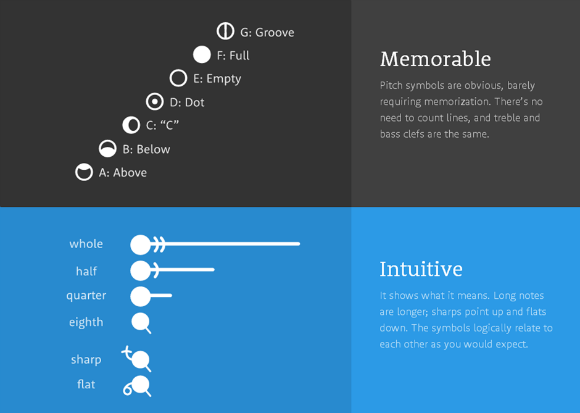
Learning to play an instrument is hard, but sheet music makes it even harder. Anyone who has been taught music will asure you that music notation never comes easily. It can often take months (or longer) to pick up. The sheet music just isn’t intuitive. And that shouldn’t be the hard part, and just like when reading a book, you think about the meaning and not which letter is which. Hummingbird’s strength is in its reinforcement. Everything has both a symbol and a spatial element so you can read it and perceive it at the same time. Plus, it does all this without sacrificing the important things ; it can show anything that traditional notation can, and you can still write it out by hand. [1]

Pitch positions haven't changed, the notes are on staff lines in the same position as in traditional notation. Each pitch also has a unique symbol with its own mnemonic “helper” word that describes it. Pitch symbols are the same for all clefs and octaves. Sharps point up and end with a + sign; flats point down and end with a 0 sign. To avoid confusion, accidentals connect directly to the note and are visible every time they occur. When it helps, naturals can be used too, and they look like = signs. Each rhythm and rest has a unique symbol. The horizontal lines for quarter, half, and whole notes extend for distances that correspond to their durations. The precise lengths may differ to allow better formatting, but within each measure they maintain correct relative proportions. Read more in the offered guide here.


Hummingbird according to its creators is "a fresh take on music notation, that is easier to learn, faster to read, and simpler for even the trickiest music." Check out the video above and try it for yourselves.

14 April, 2013

introducing the Ableton Push

"Push" is a new instrument that solves an old problem : how to make a song from scratch. With hands-on control of melody and harmony, beats, sounds, and song structure, Push puts the fundamental elements of music making at your fingertips ; and it fits in a backpack alongside your laptop. Of course you need Live 9 from Ableton as well since the pad is just the controller, but since the controller is USB connected, it is a matter of time till some mod will surface allowing for the pad to be integrated in other set-ups, or interfacing to other software suites. Live 9 runs on your Mac or PC and provides multitrack recording, instruments, effects, and everything else you need to make music.

When Ableton Live was first released over ten years ago, it was labeled a “sequencing instrument.” The radical idea was that you could “play” your production tool, which had (and has) big implications in studios, at home, and onstage. However, “playing” with a mouse and keyboard is unsatisfying for most, so even that relatively primitive first version had MIDI controller mapping.

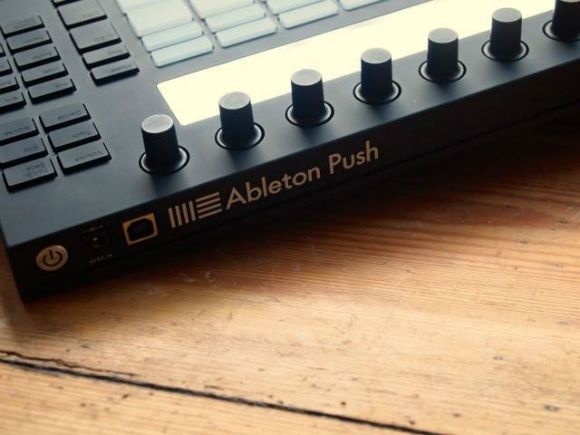
Push is a controller only; it has no audio interface. Instead, it’s a rectangular slab (a bit thicker than an average laptop, closed), dominated by an 8×8 grid of RGB-lit, pressure-sensitive pads. A vertical touch strip along the pads provides additional continuous control. Along the left and right are sets of trigger buttons for selection, editing, transport control, and other dedicated options. At top is a row of eight touch-sensitive encoders above an LED display for menus, parameters, and other functions. Push is powered via USB, but a jack for the included world-voltage AC adapter lets you increase the brightness. On the back, you’ll also find two jacks for pedals – these work just as sustain and expression pedals would normally; they’re the same as you’d find on any MIDI keyboard and can be assigned to whatever you like. (And since you might be playing a virtual piano with Push, they’re also necessary.) [1] In the following video see the Push in action :


There are a lot of ways to use Push, to the point of focusing entirely on one set of features and ignoring the rest. But the way you start a song – Push’s big selling point – is likely to appeal to a lot of users. It’s a rare case in which you’re actually likely to work in precisely the way you see in a software demo. With Push connected, Live will ask if you want to begin a new song. You can either choose your own project, or let Live add tracks for drums, bass, and the new Live 9 grand piano. Then, the idea is to start playing. You can play instruments and drums directly into clips, or step-sequence drums into clips, using new functions for creating or duplicating clips to build ideas. [1]

02 April, 2013

Paul Cocksedge launches The Vamp on Kickstarter

Thanks to modern technology, we’re now able to carry our entire music libraries in a range of portable devices, from laptops to mobiles and tablets. For sheer sound quality, however, the devices have not matched the superior audio quality of the conventional speaker. And portable Bluetooth speakers, which give consumers the freedom to link devices wirelessly and play music at any location, are expensive.

London-based designer Paul Cocksedge has created The Vamp which launched on Kickstarter. The Vamp is a gadget which allows traditional hi fi speakers to communicate with today's world of portable digital devices, allowing them to be used in the house, the garden or the park – in fact, anywhere. Old speakers can now be transformed into a portable Bluetooth speaker –for as little as £35. New technology can quickly make our gadgets and appliances obsolete, The Vamp makes a real contribution to allowing us to retain the craftsmanship and quality of well-made speakers and use them to embrace the newest wireless technology.

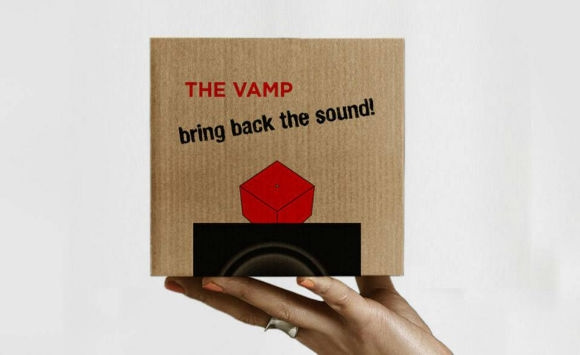
The Vamp is a cute cube shaped object with an inner magnet that allows it to stick to the side of the speaker. The internal battery can power any size speaker and means all the wires and clutter we are used to seeing are gone. It can receive sound via Bluetooth from any Bluetooth device within 10m. Paul Cocksedge says: “For me, reusing perfectly good technology makes sense. Hearing the rich sound coming out of these older speakers in a new way is a delight. They are a part of our music history.”


Paul Cocksedge Studio is the internationally acclaimed design practice of directors Paul Cocksedge and Joana Pinho. With over 10 years experience and a strong team of collaborators, the practice has developed a unique reputation for thoroughly original and innovative design, underpinned by research into the limits of technology, materials and manufacturing processes.

25 February, 2013

Exploration into music with Hitlantis

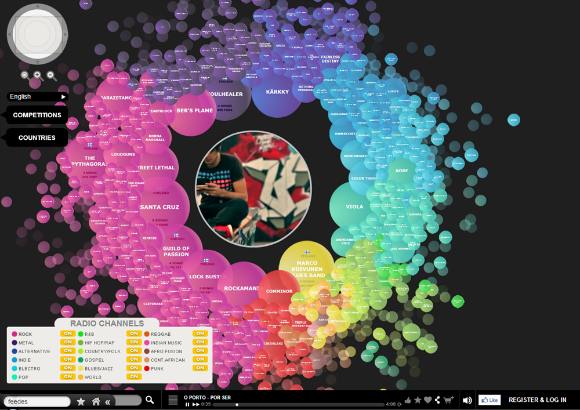
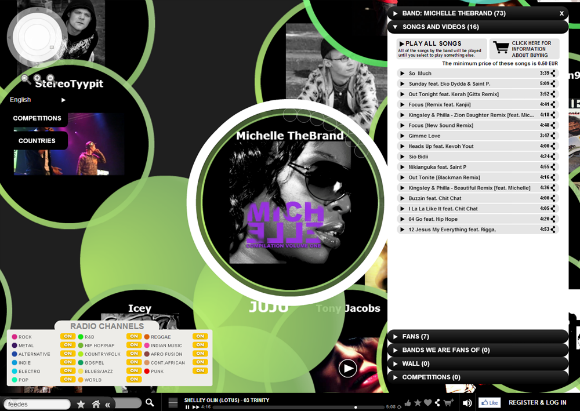
Hitlantis, from Finland, offers a completely new experience into browsing and discovering musical content. The zoomable Hitlantis Map itself is divided into different musical genres with different colours and as every Artist has a coloured ball on the Map, you will easily see which genre has the most Artists. Hitlantis is actually an action map showing visually what is going on. The closer to the Center the Artists are, the "hotter" they are as the Map shows the overall popularity by placing the Artists on the Map according to their "hotness" rate. The size of the ball represents the size of an artist meaning the nbr of fans, the revenue the band have generated and the amount of the material they’ve posted into the service. Clicking the ball opens up the Artist profile card, where you can see things like artist biography, list of their songs, pictures and you may leave comments etc.

In order to be able to use Hitlantis, you must register as either User or as an Artist. Registration and profile creation is free, and the registering process is simple as it asks you to fill in your basic user info like name, email address, country of residence and password of your choice. Then you are ready to begin editing your profile by uploading pictures and music (Artists only are allowed to upload music files).

After registration, an Artist profile will automatically appear on the Hitlantis Map as an icon shaped as a ball, colour representing the musical genre chosen by the Artist. The beginners always land onto the outer skirts of the map. Artists get hotness points and move towards to the Center when a song is listened, or when someone listening a song clicks "Thumbs up"- button on the bottom bar, when someone becomes a fan of the Artist, or finally when a song is bought. Every official fan of a band will be visualised inside the band ball as a smaller Fan Ball (in the zoomed view). Mouse over these Fan Balls will pop up a label indicating the current fan’s name and activity points. The fans are also listed in the artist profile card.

28 December, 2012

RBMA (Red Bull Music Academy)

The Red Bull Music Academy is a world-travelling series of music workshops and festivals: a platform for those who make a difference in today's musical landscape. Two groups of 30 selected participants – producers, vocalists, DJs, instrumentalists and all-round musical mavericks from around the world – come together in a different city each year. For two weeks, each group will hear lectures by musical luminaries, work together on tracks and perform in the city’s best clubs and music halls. Imagine a place that’s equal parts science lab, the Hanging Gardens of Babylon and Kraftwerk’s home studio. Throw in a touch of Haight-Ashbury circa 1967, a sprinkle of Prince Jammy’s mixing board and Bob Moog’s synthesizer collection – all in a 22nd century remix – and you’re halfway there.

The Academy began back in 1998, and has been traversing the globe since: from Berlin to Cape Town, SĂŁo Paulo, Barcelona, London, Toronto and many other places. The upcoming edition of the Red Bull Music Academy is set to take place in New York City from April 28 through May 31, 2013.

Check out this recap from the 2011 World Tour, 467 artists, 25 days in 10 cities. Visit the minisite here. To access the online lecture videos go here.

13 December, 2012

the SixtyOne

thesixtyone (t61) is a streaming media website that uses collaborative filtering to organize, promote, and sell music uploaded by artists, many of whom are independent musicians. The site was founded by James Miao and Samuel Hsiung. The site takes its name from Highway 61, a route with deep connections to American music culture. According to the site's "bazaar" where users can purchase songs or mp3 albums uploaded by artists, "thesixtyone's guiding principle is to enable the creative middle class, providing talented artists the opportunity to make a living making music." The site also allows artists to license their music under Creative Commons licenses and allow free downloads.

A big debate was started back in January of 2010, when the site chose to adopt the current minimal interface over the older more conventional one. The new layout sparked controversy among some users, leading them to direct their displeasure on the website's Facebook page, claiming that thesixtyone is a music discovery website where many indie artists could easily find listeners. The community aspect and fun features of the site were what drove users to be so passionate, and when the redesign did away with the greatest features, and killed the freedom to move around and manage playlists, left a big hole in all the hearts of the users and artists alike.

The truth is that thesixtyone makes a serious and very good effort to radically redesign the web-based music entertainment & discovery. Its interface is refreshing and beautiful, in its difference from the rest. The entire browser page is taken up with an image of the band currently-playing, with snippets about the artist fading in and out, while the player controls, along with sharing options, slide elegantly out of tabs on the borders of the page.

To be honest I usually use it as a radio with just the mood selector, listening to beautiful musik while I'm working other stuff.

07 December, 2012

loopy app for iOS

"Create music by layering looped recordings of singing, beatboxing, or playing an instrument with a savvy, sophisticated, tactile looper". And that's it. Precise and concise. This is loopy, an application for iOS devices, that will blow your mind, with its simplicity and  straightforwardness. Don't be put-off though, since it jam-packed with features, enough to render your work, plainly awesome.


Now watch the following video from artist DubFx, producing music by using the app from his iphone, and you will see my point. Dub Fx is a worldwide street performer, recording artist and professional beatboxer. His trademark is creating rich live music using only his voice, aided by live looping and effect pedals.

welcome dear reader.

blank

What you are browsing through is the initial form of a gazette, realised at this stage by a collection of posts brought together, from various fields & selected topics, aiming towards your entertainment and information. Some are own generated, others are processed re-ups from the blogosphere. Please feel free to browse, read, and distribute the content here.

blank

If you find what you read here as interesting, entertaining or thought-provocative, please tell it to your friends. New readers are always welcome. If you have copyright claims, please let us know, and we will amend accordingly.

blank

Images presented herein, are the property of their originators, unless stated otherwise. The METRONOME gazette wishes to declare that to the best of its knowledge, all photos and information presented in this website are true and valid, however it carries no responsibility as to the accuracy of the depictions, or wording of the posts, that are not of its own origination.

blank

Please do not hesitate to contact us with any inquiry or question you may have. See the Contact details section.
  

blank

about

blank

contact

blank

editorial

blank

theNEWSroom

blank

theMAGAZINErack

blank

DIY projects

blank

GAMESZONE

blank

GoingOUT

blank

Food4Thought

blank

PROJECTS

blank

blank

blank